


Viu Search Experience
Viu Search Experience
Solving Search Logic & Localization for 66M+ Global Users
Solving Search Logic & Localization for 66M+ Global Users
UI/UX Design, Search Logic, Multilingual UX, Technical Problem Solving
UI/UX, Brand & Web Design, Design System
October 2022 - July 2023
October 2022 - July 2023
Platform: Web & App
Platform: Web & App
Tools: Figma, Google Analytics, Hotjar, Lookback
Tools: Figma, Google Analyrics, Hotjar, Lookback
Summary
Summary
Viu is a leading streaming platform serving 66M+ monthly users. I owned the redesign of the search and discovery experience to solve critical usability gaps in content retrieval. By focusing on search logic and multilingual support, I transformed a high-friction process into a streamlined path to content, ensuring users across diverse regions could find what they love in seconds.
Viu is a leading streaming platform serving 66M+ monthly users. I owned the redesign of the search and discovery experience to solve critical usability gaps in content retrieval. By focusing on search logic and multilingual support, I transformed a high-friction process into a streamlined path to content, ensuring users across diverse regions could find what they love in seconds.
Problem
Problem
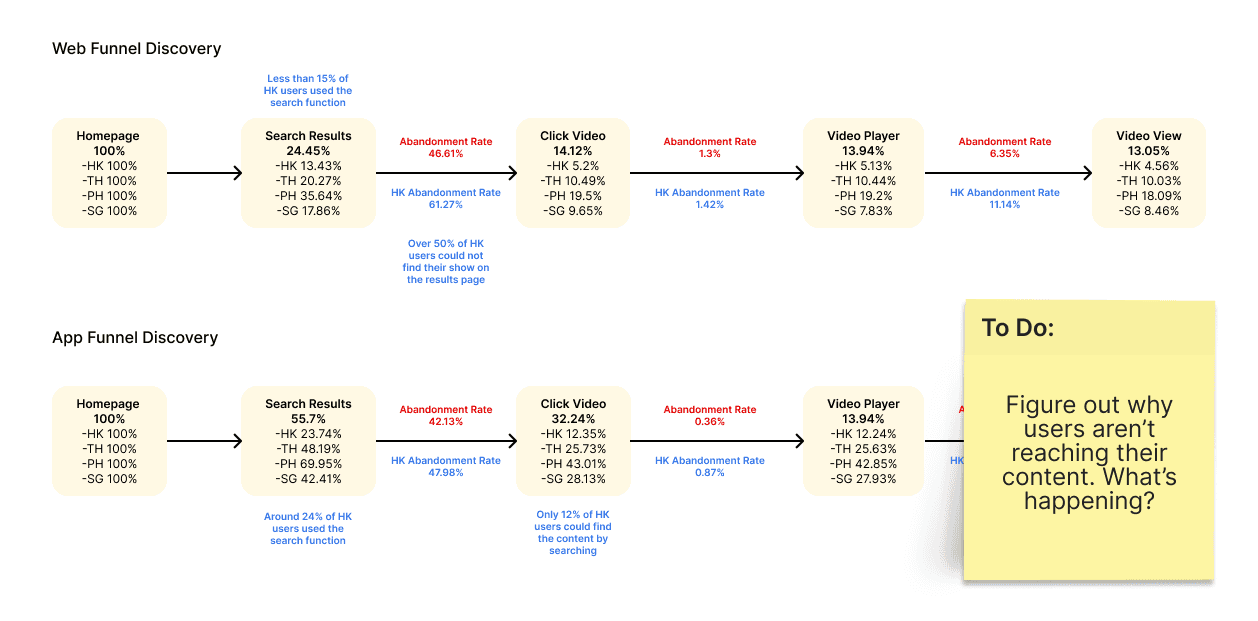
Viu’s search experience was a major point of friction, leading to significant user abandonment. My audit of 5,000+ search queries revealed that the system was failing our users at a fundamental level:
The 40% Failure Rate: Quantitative data showed that 40% of all searches resulted in a "No Results" state, primarily because the database couldn't reconcile English phonetics with non-Latin content.
The Mobile Funnel Gap: While web discovery was stable, the App funnel showed a 50% higher drop-off rate. Mobile users, facing the frustration of "No Results" and a small keyboard, chose to exit the app rather than re-type their query.
Database Silos: The underlying technical architecture prevented the search engine from "speaking" across language libraries, creating a dead-end for millions of multilingual users.
Viu’s search experience was a major point of friction, leading to significant user abandonment. My audit of 5,000+ search queries revealed that the system was failing our users at a fundamental level:
The 40% Failure Rate: Quantitative data showed that 40% of all searches resulted in a "No Results" state, primarily because the database couldn't reconcile English phonetics with non-Latin content.
The Mobile Funnel Gap: While web discovery was stable, the App funnel showed a 50% higher drop-off rate. Mobile users, facing the frustration of "No Results" and a small keyboard, chose to exit the app rather than re-type their query.
Database Silos: The underlying technical architecture prevented the search engine from "speaking" across language libraries, creating a dead-end for millions of multilingual users.
Goals
Goals
Increase Speed-to-Content: Support partial title and mixed-language searches to reduce user effort.
Eliminate Dead Ends: Enrich the "No Results" experience with trending and personalized recommendations.
Technical Bridge: Design a UI workaround that allowed users to toggle between different language databases seamlessly.
Increase Speed-to-Content: Support partial title and mixed-language searches to reduce user effort.
Eliminate Dead Ends: Enrich the "No Results" experience with trending and personalized recommendations.
Technical Bridge: Design a UI workaround that allowed users to toggle between different language databases seamlessly.
Research & Insights
Research & Insights
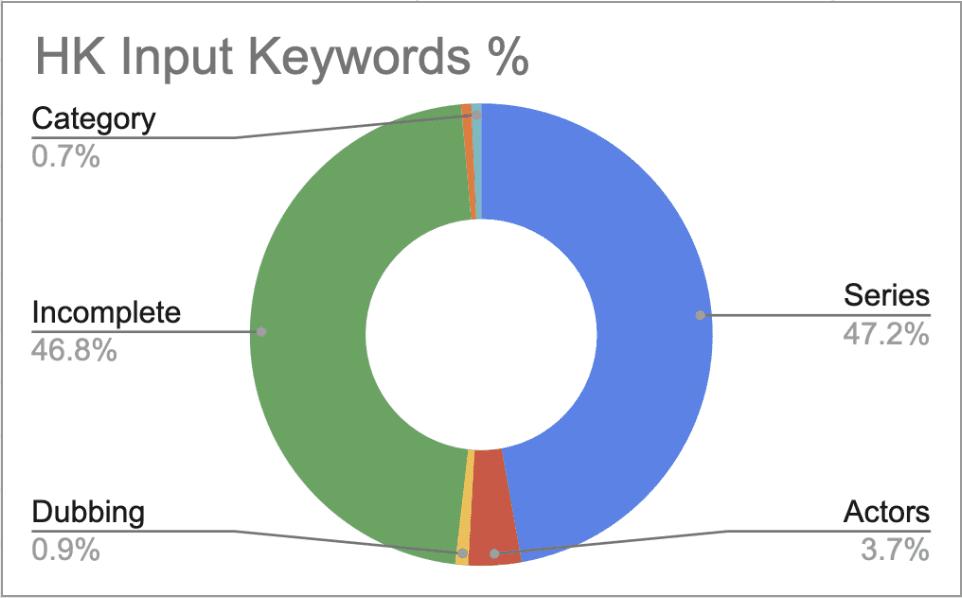
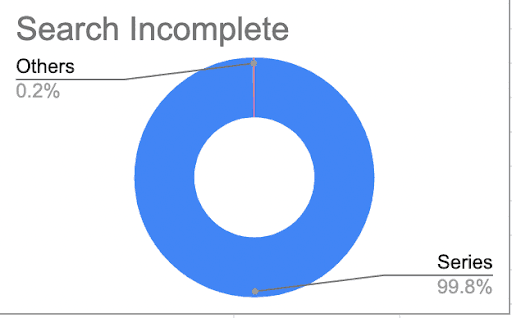
With the "what" defined by the search failure data, I used Hotjar recordings and Behavioral Mapping to understand the "why" behind the user abandonment.
With the "what" defined by the search failure data, I used Hotjar recordings and Behavioral Mapping to understand the "why" behind the user abandonment.
🧠 The "Google" Expectation:
Users approached the search bar expecting high-level "fuzzy matching" and autocorrect. When the system failed to provide this, it broke trust in the platform's dependency, leading to immediate exits.
🧠 The Zero-State Opportunity:
I observed that users often tapped the search icon without a specific title in mind. The legacy design left the screen blank, missing a critical opportunity for proactive discovery and personalized engagement.
🧠 The Metadata Gap:
Cross-referencing failed keywords with our library revealed that many shows existed but were tagged incorrectly for phonetic search. This insight proved that the solution required a mix of UI design and metadata standardization.
🧠 The "Google" Expectation:
Users approached the search bar expecting high-level "fuzzy matching" and autocorrect. When the system failed to provide this, it broke trust in the platform's dependency, leading to immediate exits.
🧠 The Zero-State Opportunity:
I observed that users often tapped the search icon without a specific title in mind. The legacy design left the screen blank, missing a critical opportunity for proactive discovery and personalized engagement.
🧠 The Metadata Gap:
Cross-referencing failed keywords with our library revealed that many shows existed but were tagged incorrectly for phonetic search. This insight proved that the solution required a mix of UI design and metadata standardization.
🧠 Empathy Mapping Workshop
By synthesizing user pain points and emotional responses, wefined two key areas of opportunity: better search handling and smoother discovery from dead ends.
🧠 Empathy Mapping Workshop
By synthesizing user pain points and emotional responses, wefined two key areas of opportunity: better search handling and smoother discovery from dead ends.

Solution & Process
Solution & Process
✨ Smart Language Logic:
Since the backend couldn't merge databases, I designed a "Language Toggle" chip that appeared dynamically when the system detected a potential cross-language match, allowing users to redirect their search with one tap.
✨Fuzzy Matching UI:
I collaborated with engineering to implement "Did you mean?" logic, ensuring that the 30% of users making minor typos were still guided to the correct content rather than a dead end.
✨ Predictive Autocomplete:
I designed a visually-rich autocomplete that prioritized Program Titles over Categories, reducing "Time-to-Content" by allowing users to jump directly to a show from the search input.
✨ The "Active" No-Results Page:
I transformed the dead-end "No Results" screen into a discovery hub, featuring personalized recommendations and trending shows to keep the user engaged even when their exact query wasn't found.
✨ Content Tagging & Prioritization
Refined CMS keyword tagging to support partial queries and prioritized program titles.
Designed an "All Results" page to streamline visibility across content types.
✨ Multi-language Support
Built a workaround for multi-database limitations.
Introduced a chip-style button that detects alternate languages and redirects users to the appropriate language database.
✨ Search UI & No-Results Guidance
Designed predictive, visually guided input with autocomplete and highlighted matching terms.
Redesigned no-results pages to offer personalized suggestions and trending topics.
✨ Prototyping & Testing
Created high-fidelity mockups for desktop and mobile.
Conducted usability tests internally and externally.
Iterated based on feedback and technical feasibility discussions with developers.
Impact & Metrics
Impact & Metrics
25% Faster Time-to-Content: Internal testing showed a significant reduction in the time it took for users to reach playback from the search bar.
20% Lower Bounce Rate: By enriching the "No Results" experience, we successfully kept users on the platform even when their exact query wasn't found.
Successful Technical Workaround: The implementation of the language-detecting chip successfully bypassed database silos, significantly increasing search success for multilingual users.
25% Faster Time-to-Content: Internal testing showed a significant reduction in the time it took for users to reach playback from the search bar.
20% Lower Bounce Rate: By enriching the "No Results" experience, we successfully kept users on the platform even when their exact query wasn't found.
Successful Technical Workaround: The implementation of the language-detecting chip successfully bypassed database silos, significantly increasing search success for multilingual users.
Reflection
Reflection
This project taught me that Design is often the bridge for technical limitations. As a Product Designer, my role wasn't just to make the search bar look better; it was to understand the underlying database constraints and design a user-facing logic that solved the problem without requiring a multi-year engineering rewrite.
This project taught me that Design is often the bridge for technical limitations. As a Product Designer, my role wasn't just to make the search bar look better; it was to understand the underlying database constraints and design a user-facing logic that solved the problem without requiring a multi-year engineering rewrite.